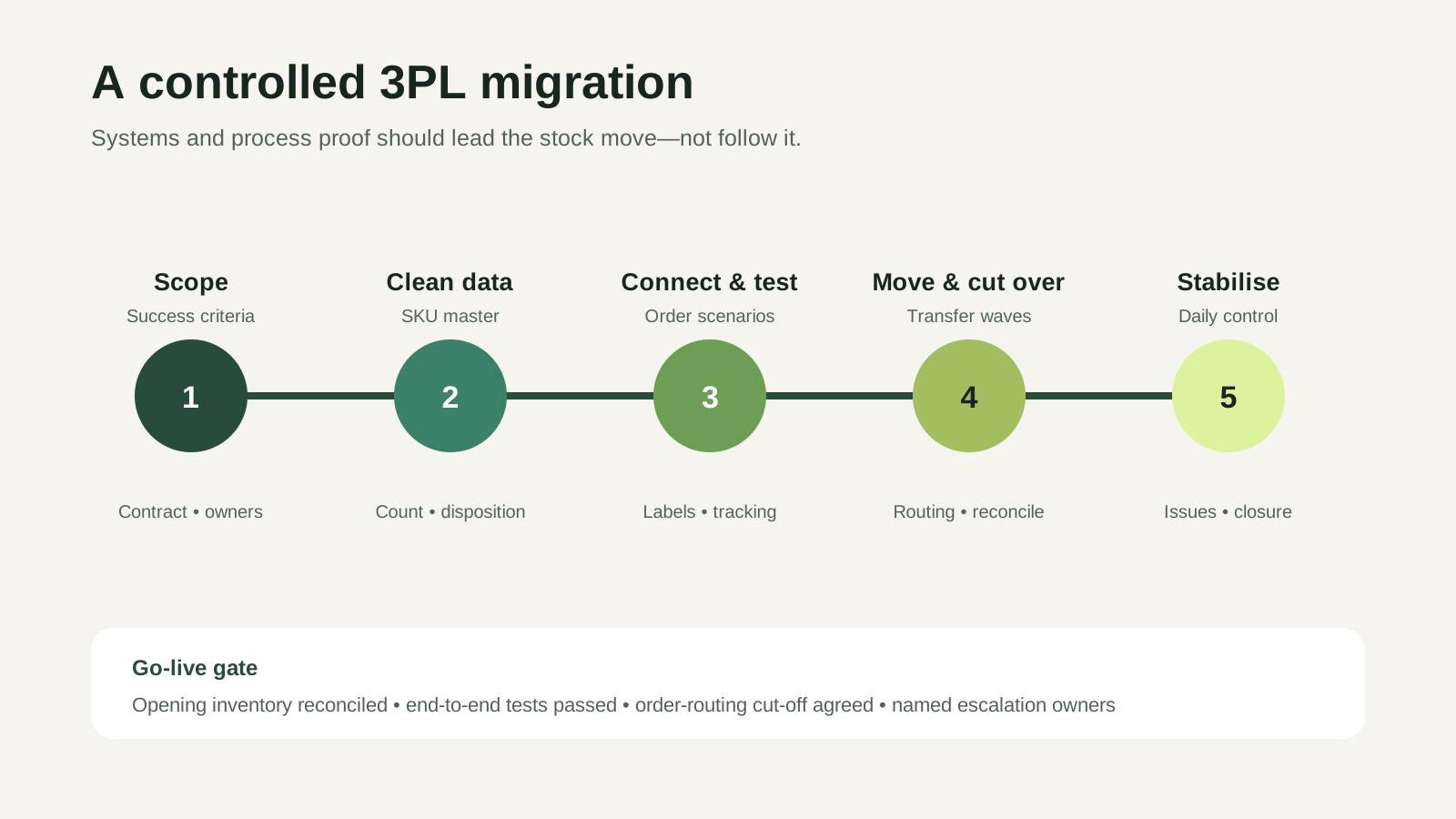
Switching fulfilment providers is not simply a warehouse move. Inventory, order routing, integrations, packaging, returns and customer promises must transfer without creating two versions of the truth. The safest migration separates preparation from physical movement and gives every critical decision an owner.
This guide is for ecommerce teams that have decided—or are seriously considering—moving to a new 3PL. It explains how to plan the transition, test the new operation and protect live orders while stock is in motion.
Start by defining why the move is necessary
A migration consumes attention and creates temporary risk. Document the problems the new provider must solve so that selection and onboarding do not reproduce the same issues.
Common triggers include unreliable order processing, poor inventory visibility, insufficient peak capacity, recurring unexplained charges, slow issue resolution or new operational requirements. Convert each concern into a measurable acceptance criterion. “Better reporting” might become daily inventory visibility, access to order status and an agreed exception report.
Read the existing contract before setting a date
The commercial exit terms shape the migration plan. Review notice periods, stock-removal charges, final counts, data-export rights, outstanding-project obligations and the conditions under which inventory can be released.
Agree how disputed balances will be handled and who supplies pallets, labels or transport for the move. If branded packaging and marketing inserts are held separately, include them in the transfer scope rather than treating them as an afterthought.
Create one migration inventory
The system record, warehouse count and finance record may not agree perfectly. A move magnifies those differences because stock is split across two locations and some units are in transit.
Create a controlled migration file with the SKU, barcode, description, dimensions, weight, lot or expiry data where relevant, current quantity, destination quantity and disposition. Identify stock that is damaged, quarantined, obsolete or subject to an open return. Decide which inventory should move, remain temporarily or be disposed of with approval.
Choose the reconciliation point
Define when the outgoing count becomes the opening balance for the new warehouse. Record variances at that handover point rather than carrying unexplained differences into the new system.
For a phased move, reconcile each wave independently. That makes it easier to locate a discrepancy than comparing two changing warehouses after several days of transactions.
Map every order and inventory data flow
List each sales channel, marketplace, order-management tool, carrier, return route and reporting destination. For every connection, define which system owns the order, inventory quantity, cancellation, tracking number and refund status.
Stashworks describes a web-based warehouse management system with real-time stock visibility, low-stock notifications, reporting, integrations and an open API. The exact workflow for each of your channels should still be confirmed and tested during onboarding.
Do not limit testing to a standard one-item order. Include bundles, multi-item orders, partial stock, address changes, cancellations, failed payments, returns and any marketplace-specific label or packing rule.
Document the physical operating rules
The new warehouse needs more than product data. It needs to know how inventory should be received, stored, picked, checked, packed and handled when something is wrong.
Prepare product photographs, barcode rules, fragile or special-handling instructions, approved packaging, bundle definitions, inserts and return dispositions. Define who can approve substitutions or process changes during the stabilisation period.
Choose the right cutover model
There are three common ways to transfer the operation. The right choice depends on order volume, SKU complexity, available stock and the ability to route orders between warehouses.
ModelHow it worksMain trade-offBig-bang cutoverAll stock and order routing change in one planned windowShort transition, high concentration of riskPhased by SKU or channelSelected products or channels move in wavesLower wave risk, more complex routingParallel runBoth providers fulfil controlled order groups temporarilyStrong comparison, duplicate coordination and cost
A phased migration is often easier to diagnose, but it requires an unambiguous rule for which warehouse owns each SKU and order. A big-bang move can be appropriate for a small, clean catalogue with a manageable stock count and a quiet trading window.
Build the cutover calendar backwards
Start with the first day the new operation must handle live orders. Work backwards through integration testing, receiving capacity, transport, outgoing count, customer-service preparation and contractual notice.
Avoid major campaigns, marketplace sales events and product launches where possible. If timing cannot move, establish additional stock, labour and communication contingencies rather than assuming the migration will be invisible.
Protect orders while stock is in transit
Inventory in a truck is not available inventory. Decide whether to pause affected products, hold safety stock at the new warehouse, move in waves or temporarily extend dispatch promises.
Set a clear order-routing cut-off. Orders created before the cut-off remain with the outgoing provider; later orders route to the new provider. Record how late cancellations, replacements and returns for pre-cutover orders will be handled.
Run acceptance tests before live volume
An integration connection is not the same as an operating proof. Create test orders with known expected results and follow them from channel to shipment confirmation.
Acceptance should cover:
- Correct order import and duplicate prevention
- Inventory reservation and channel updates
- Barcode scanning and item verification
- Approved packaging, documents and labels
- Tracking returned to the sales channel
- Cancellation and address-change cut-offs
- Returns intake and disposition
- Reports needed by operations and finance
Capture screenshots, IDs and timestamps. When a test fails, record whether the cause is data, configuration, process or training, then repeat the complete scenario after correction.
Move stock with chain-of-custody evidence
Each transfer wave should have an outgoing count, transport document, seal or pallet identifiers where appropriate, arrival record and receiving result. Photograph damaged or visibly compromised stock at handover.
Do not release every wave faster than the new warehouse can receive and reconcile it. Unprocessed cartons create apparent inventory that cannot yet be sold and make discrepancies harder to investigate.
Prepare customer service for the transition
Customers do not need the operational detail, but the service team needs accurate answers. Give them the cutover dates, affected order groups, tracking process, escalation route and approved explanation for any temporary delay.
Monitor complaints, failed deliveries, “where is my order?” contacts and replacements more closely during the first weeks. These signals can reveal a workflow problem before it becomes visible in a monthly report.
Use a stabilisation period with daily ownership
The migration does not end when the last pallet arrives. For an agreed period, review daily order flow, inventory variances, receiving backlog, late orders, packing errors, cancellations, returns and unresolved exceptions.
Assign one owner on the brand side and one at the 3PL. Maintain a single issue log with severity, owner, next action and deadline. Separate genuine launch defects from changes to the original scope so that urgent corrections are not delayed by commercial ambiguity.
Close the old operation deliberately
After stock and live work have moved, reconcile residual inventory, open orders, returns in transit, packaging materials, credits, claims and final invoices. Obtain the required data exports and remove system access only after the business confirms that no operational dependency remains.
Retain the final stock reconciliation and migration decisions. They provide the opening audit trail for the new operation and a useful baseline for future performance reviews.
A practical next step
Before selecting a cutover date, prepare four artefacts: the migration inventory, the system-flow map, the test plan and the cutover calendar. If any one is missing, the physical stock move is premature.
Stashworks lists freight forwarding, warehousing, ecommerce fulfilment, last-mile delivery and custom operational support within its current service offering. Share your SKU, channel, inventory and timing profile through the contact page to scope a transition. Keep all commitments, timelines and channel-specific behaviour subject to a written migration plan.
A migration plan should also include governance after cutover. Use 3PL Risk Management for continuity planning and 3PL Contract Terms Explained when reviewing exit and transition responsibilities.